3 Expert Tips to Fix “Windows Could Not Detect Proxy Settings”
News25/12/2025, 10:02Modified 13/09/2026, 00:455 min read
When you come across errors such as “Windows could not automatically detect proxy settings,” it can be quite annoying when your internet stops working out of the blue. You may also notice that websites won’t load, apps won’t connect, and you continually see network warnings when your Wi-Fi or Ethernet appears to be connected.
Recommended: static ISP proxies for Windows.
The good news is that this issue is one of the simplest to fix. It's commonly due to misconfigured network settings, leftover proxy settings or damaged system files. Check out 3 troubleshooting methods that come highly recommended from the experts, breaking them down step by step.
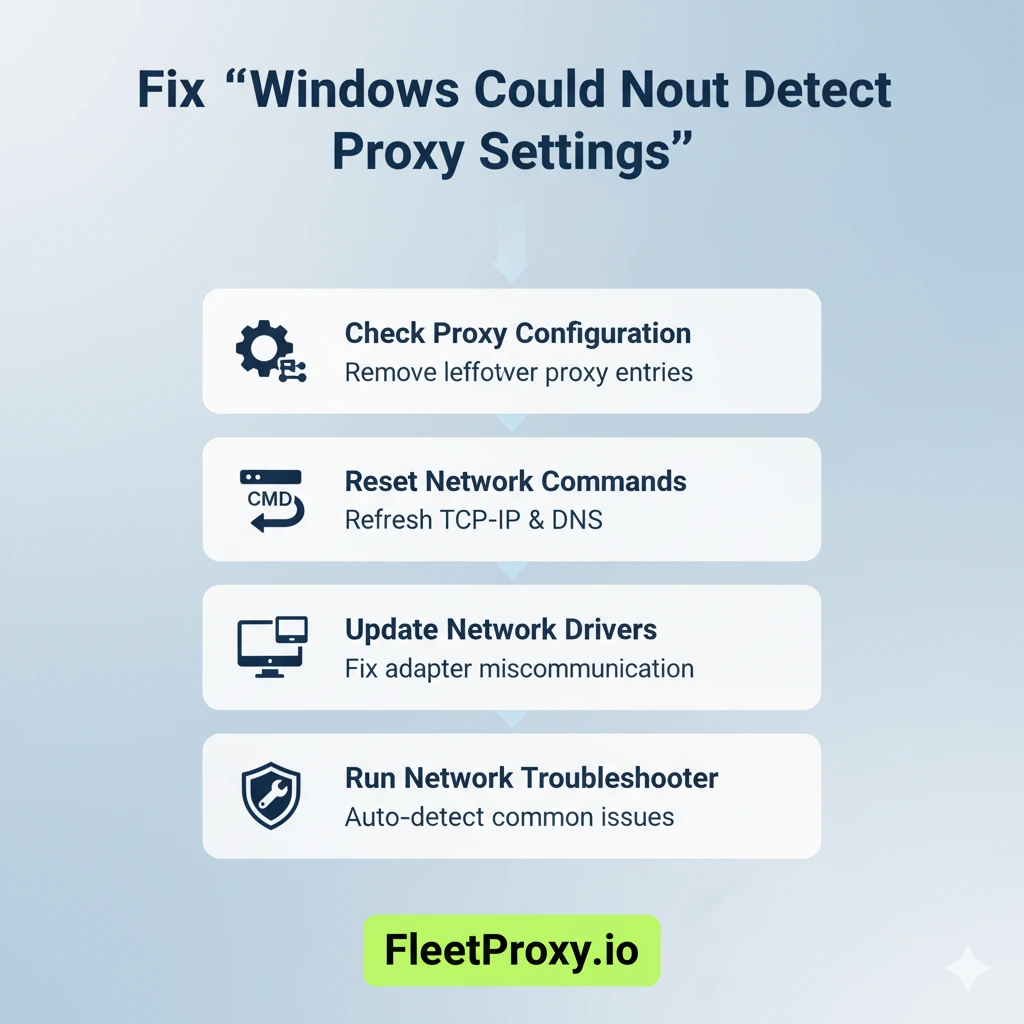
Tip 1: Inspect and Reset Proxy Settings
Incorrect proxy settings or remnants of them are the most common cause of this error. Many users don’t even know they have a proxy enabled, whether through VPNs, browser extensions, or previous network accommodations.
How to Fix It?
• Open Settings by pressing Windows + I
• Go to Network & Internet
• Click on Proxy from the left side menu
• Turn off under Automatic proxy setup: Automatically detect settings
• Ensure Manual proxy setup is set to: “Use a proxy server” is not checked
When it has completed, reboot your computer and connect to the internet.
Also Read: Proxy Setting in WiFi
Why This Works?
When it continues to dig around for a proxy that doesn’t exist, then it won’t connect properly. Resetting these settings will force Windows to use a direct connection, fixing the problem in most situations.
Tip 2: Reset Network Settings and Flush DNS
If nothing is wrong with your proxy settings, corrupted network configurations could be responsible. This frequently occurs with Windows updates, driver changes, and some malware.
Step-by-Step Solution
Windows + R (open the Run Box), type cmd, then Ctrl + Shift + Enter to open the CMD as admin. Type the following commands, one line at a time, & do not forget to press Enter after all of them:
• netsh int ip reset
• netsh winsock reset
• ipconfig /flushdns
Restart your PC
What This Does
• Resets TCP/IP settings
• Clears DNS cache
• Fixes corrupted Winsock entries
This resets your entire network stack and would eliminate hidden configuration errors that may cause Windows to abandon proxy detection.
Also Read: Improve Anonymous Proxy Security
Tip 3: Update or Reinstall Network Drivers
Obsolete or corrupted network drivers may also provoke this error. Assuming that Windows is failing to communicate properly with your network adapter, it could be getting the wrong idea regarding the detection of a proxy.
How to Update Drivers
• Press Windows + X and click on Device Manager
• Expand Network adapters
• Then right-click your active adapter (Wi-Fi or Ethernet)
• Click Update driver
• Choose Search automatically for drivers
If Windows recognises the driver as up to date and yet you're still having problems:
• Right-click the adapter again
• Select Uninstall device
• Reboot your computer (Windows will reinstall the driver automatically)
Expert Tip
If you have recently installed a VPN, antivirus, or firewall, try temporarily disabling it and check if it works. Some security programs manipulate proxy or network settings in a hidden way.

Additional Tip: Use the Windows Network Troubleshooter
It doesn’t always work, but it’s worth a try:
• Open Settings > Network & Internet
• Click Network troubleshooter
• Follow on-screen instructions
It's capable of identifying misconfigured settings and apply suitable fix in one click.
Final Thoughts
The ‘Windows could not automatically detect proxy settings’ error appears scary, but it’s really a simple issue to fix.
In the majority of these instances, testing proxy settings or resetting network options should resolve it in a matter of minutes. Otherwise, a network driver update will frequently fix things.
Go through these tips one by one, and you should have your internet connection up and running much faster than any call to a provider’s hotline will stop the hold music.
Also Read: How to Track an IP Address?
FAQs
Q1: Why does Windows stop detecting proxy settings?
Ans: Common reasons include an incorrect proxy, VPN, or network configuration, such as multiple networks; old network drivers and adapters, corrupted DNS cache; and conflicts from Windows updates.
Q2: Does malware result in this proxy error?
Ans: Yes. Some malware modifies your proxy or DNS settings. If the problem just keeps coming back, run a full antivirus scan.
Q3: Should I leave “Automatically detect settings” turned on?
Ans: For most homes, it can be safely turned off. Its use is really only necessary in corporate or managed networks.
Q4: If I reset network settings, will my Wi-Fi passwords be erased?
Ans: Yes, a complete network reset will delete saved Wi-Fi connections. Just make sure you know your passwords before you do so.
Q5: Would reinstalling Windows fix this error?
Ans: The fix is to reinstall Windows, but it’s another rare case. Start with the steps above, they work most of the time.

Michael Maelar
Head of Proxy Infrastructure


Michael Maelar leads proxy infrastructure at FleetProxy, where he focuses on residential and mobile IP network performance, ethical sourcing, and rotation engineering. Before joining FleetProxy in 2025, he spent six years working on web scraping infrastructure and anti-bot evasion for e-commerce data teams. He writes about proxy networks, scraping reliability, and the practical tradeoffs between provider tiers.


Ready to try FleetProxy?
Residential proxies from $2.65/GB on real IPs across 100+ countries. Instant activation with 24/7 expert support.
Get StartedReady to try FleetProxy?
Residential proxies from $2.65/GB on real IPs across 100+ countries. Instant activation with 24/7 expert support.
Get StartedMore popular posts
Tips to Use a JP Web Proxy to Browse Japanese Websites Safely.
Have you ever clicked on a link to an exciting Japanese video, a regional news article, or a unique e-commerce site, only to be met with a frustrating error message? "This content is not available in your region." This digital barrier, known as geo-blocking, is a common hurdle for international fans of Japanese culture, researchers, and expats alike.

How to Use SOCKS5 Proxy on iPhone
SOCKS5 proxy is a safe connection protocol that directs your internet traffic over another server. This server covers your actual IP address and provides a new one.
How much does an IP address cost in 2025?
The IP address cost in 2025 varies across regions. Larger blocks are cheaper per IP but costly overall, while smaller blocks offer more stability, clarity and security. No matter the option, understanding these trends helps businesses make smarter and more cost-effective decisions