Sneaker sites are more powerful than ever. Their anti-bot systems learn fast. They follow patterns, observe IP behavior, and watch how tasks transfer.
One false move, and your IP address gets flagged. In the event that occurs, checkouts break, lines are frozen, and accounts don’t work.
You need a clean setup to stay safe. Cueing that is both natural to use, moves well, and doesn't let you see the obvious automation cues. Here’s how to not get banned with your IP while running a sneaker bot.
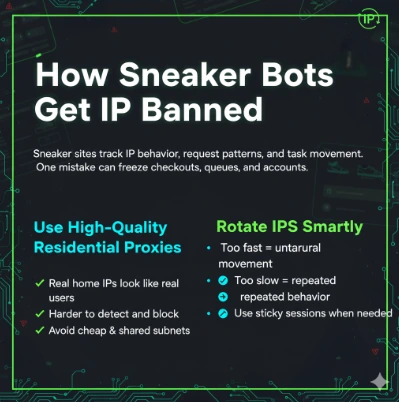
Use High-Quality Residential Proxies
Residential proxies let you disappear into the crowd. They are based on actual household networks. It makes them appear to be real users. Ans unless you abuse them, sneaker sites find it difficult to track or block them.
Cheap proxies are risky. They are shared on subnets, they have repeated IP addresses, and they will slow down under load. This creates patterns. Patterns lead to bans.
Look for a provider with:
• A large rotating IP pool
• Country and city-level targeting
• Reliable speed during hype drops
Prefer a reliable supplier to avoid soft bans and extend the duration of your jobs.
Read also: How to use Residential Proxies for Sneaker Bots
Rotate IPs the Right Way
Rotation is one of the basic safety measures. But careless rotation is harmful. If your IP address changes too much, the site detects “unnatural movement.” If your IP doesn’t change for too long, it leads to behavior that repeats.
A timed sequence is a nice approach for things that are steady. One way sticky sessions can be helpful is for a task that must remain on the same page. Decide the rotation mode according to how your bot works.
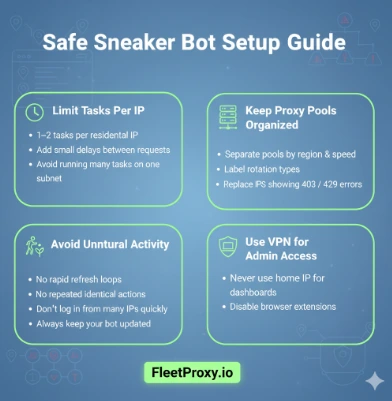
Limit Tasks Per IP
Too many jobs on a single IP? It’s a red flag. It's a scripted bulk action, as sites see it. Safe numbers are simple:
• 1–2 tasks per residential IP
• Slight delays between requests
• Keep booster tasks controlled
Don't run large task groups on the same subnet. That leaves a big footprint that can be tracked.
Lean more: Introducing Residential Proxy
Keep Proxies Organized
Many new users just put all the proxies into one block. This creates messy traffic. Instead, separate your pools. Organizing pools prevents cross-contamination. If one company holds your set for suspicious behavior, your other pools are still clean.
Add labels inside your bot. Sort by region, speed, & rotation style, as this can make the first part of your pre-drop setup much faster and safer.
Test, test, & then test some more prior to release. Never enter a release blind because a quick test prevents disaster.
If you begin seeing errors 403, 429, or 430, that batch is being marked. Swap it fast. Pre-release testing of a few IPs saves hours of failure.
Also, Minecraft logs during the drop. Watch for sluggish captcha loading or checkout slowing down. Those signals indicate your pool may be overwhelmed or partially obstructed.
Avoid Unnatural Behavior
Sneaker sites track patterns. They observe how your bot navigates from one page to the next. Suddenly, identical spikes in requests start to look suspicious pretty quickly.
Things to avoid:
• Refreshing too often
• Repeated identical tasks
• High request frequency
• Logging into accounts with varied IPs in a matter of minutes
Use Multiple Locations
Different regions behave differently. In some spots, some sites put such thick filters on. The latter could, in some cases, open checkouts sooner, based on server proximity.
This also prevents region-based blocks. If one part gets banned, the others can keep running smoothly.
Keep Your Bot Updated
Developers of bots are constantly implementing new checkout flows. These updates are in line with the site’s new security policies. If you are running an old version, the site will recognize outdated patterns.
Updates improve proxy compatibility. They tweak delays and captcha triggers, and how to handle the queue. When using an outdated build, you are risking getting banned.
Learn More: Use a proxy for Runescape botting
Avoid Unsafe Proxies
Never combine free proxies with actual proxy pools. Free proxies are flagged, slow, and frequently shared amongst thousands of people. Similarly, try not to use the same IP too frequently.
Sneaker sites store historical behavior. Once flagged, that IP is permanently at risk. Reset your pool often. Take out IPs that present several blocks. Dirty pools risk lowering your success.
Use a VPN for Admin Access
Never access your bot dashboard and your admin panels on your home IP. Always use a secure VPN. It pulls out your identity from the bot state.
Also, disable your browser extensions when visiting your bot or proxy panels. Extensions leak data. Clean environments prevent accidental exposure.
Bottom Line!
Just don’t give the system something to ban you for. It’s all about creating a natural flow. Use clean residential proxies. Rotate carefully. Keep pools organized. Limit tasks per IP. Test before releases. Spread locations. Monitor everything.
Put the two in sync (proxies and bots), and you will not get caught. You stay in queues longer. You enter checkouts faster. And your likelihood of getting pairs increases as it continues to drop. Because a 50/50 setup is the key to permanent bans one day, and wins the other one.
FAQs
Q1: Why do sneaker sites ban IPs?
Ans: They identify machine-like activity, repeated requests, large task numbers, & suspicious subnet patterns. These signals cause blocks to be put in place to prevent bots from making new releases.
Q2: How many activities can I reasonably perform per IP?
Ans: The Majority of our usage is 1 – 2 tasks per residential IP. Anything over that spikes patterns and causes (temporarily) throttling or bans.
Q3: Are home proxies the safest choice?
Ans: Yes, they originate from home networks, just like the real ones, and look natural. This is to limit soft bans and enhance success rates in restricted release.
Ready to try FleetProxy?
Residential proxies from $2.65/GB on real IPs across 100+ countries. Instant activation with 24/7 expert support.
Get StartedReady to try FleetProxy?
Residential proxies from $2.65/GB on real IPs across 100+ countries. Instant activation with 24/7 expert support.
Get StartedMore popular posts
Tips to Use a JP Web Proxy to Browse Japanese Websites Safely.
Have you ever clicked on a link to an exciting Japanese video, a regional news article, or a unique e-commerce site, only to be met with a frustrating error message? "This content is not available in your region." This digital barrier, known as geo-blocking, is a common hurdle for international fans of Japanese culture, researchers, and expats alike.

How to Use SOCKS5 Proxy on iPhone
SOCKS5 proxy is a safe connection protocol that directs your internet traffic over another server. This server covers your actual IP address and provides a new one.
How much does an IP address cost in 2025?
The IP address cost in 2025 varies across regions. Larger blocks are cheaper per IP but costly overall, while smaller blocks offer more stability, clarity and security. No matter the option, understanding these trends helps businesses make smarter and more cost-effective decisions